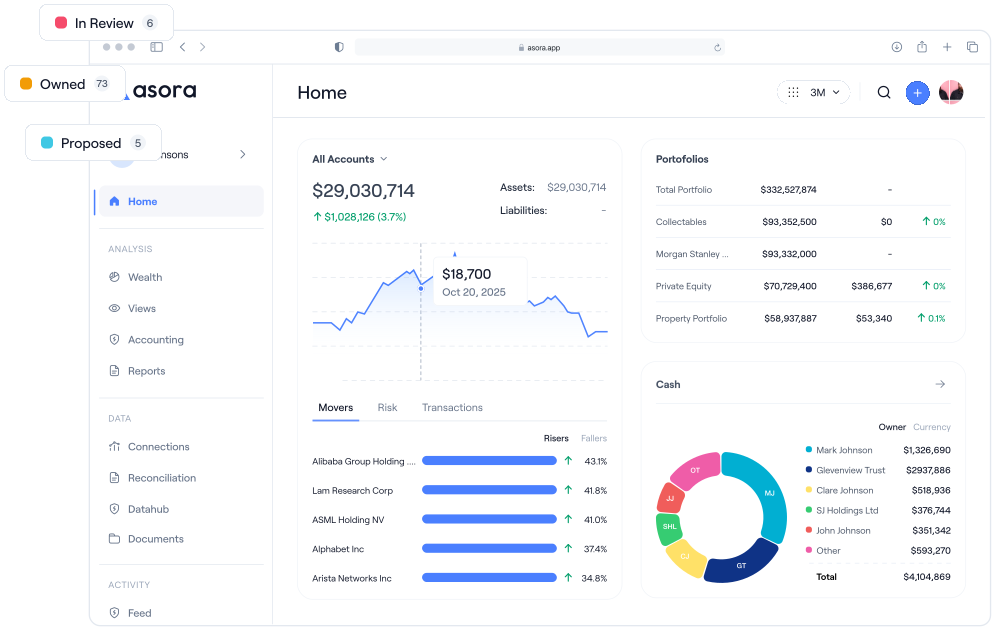
.png)
Introduction
Excel has been the backbone of family-office reporting for decades. It’s familiar, flexible, and requires no additional software investment. For many single-family offices, Excel spreadsheets have provided the foundation for tracking investments, generating reports, and managing family wealth across multiple entities.
But as portfolios grow in complexity and alternative investments become more prevalent, the limitations of spreadsheet-based reporting become increasingly cumbersome. Manual data entry, version-control issues, and security concerns are pushing family offices toward specialised investment-management software designed specifically for their needs.
Below, we’ll look at the real-world trade-offs between continuing with Excel versus adopting Asora, a modern family-office platform built for today’s complex wealth-management requirements.
Excel’s Role in Family Office Reporting
Excel became the default choice for family offices because it offered unprecedented flexibility at minimal cost. Financial advisors and family-office professionals could create custom formulas, build complex models, and generate reports without specialised training or significant software spend.
For smaller, simpler portfolios, Excel remains adequate. A single-family office managing primarily public securities can often meet reporting needs with well-designed spreadsheets, enjoying full control over calculations, formatting, and data presentation.
Excel also integrates with other systems through CSV exports and basic data imports, making it a natural choice for offices compiling information from multiple sources into unified reports for family members and wealth managers.
The Limitations of Excel for Modern Family Offices

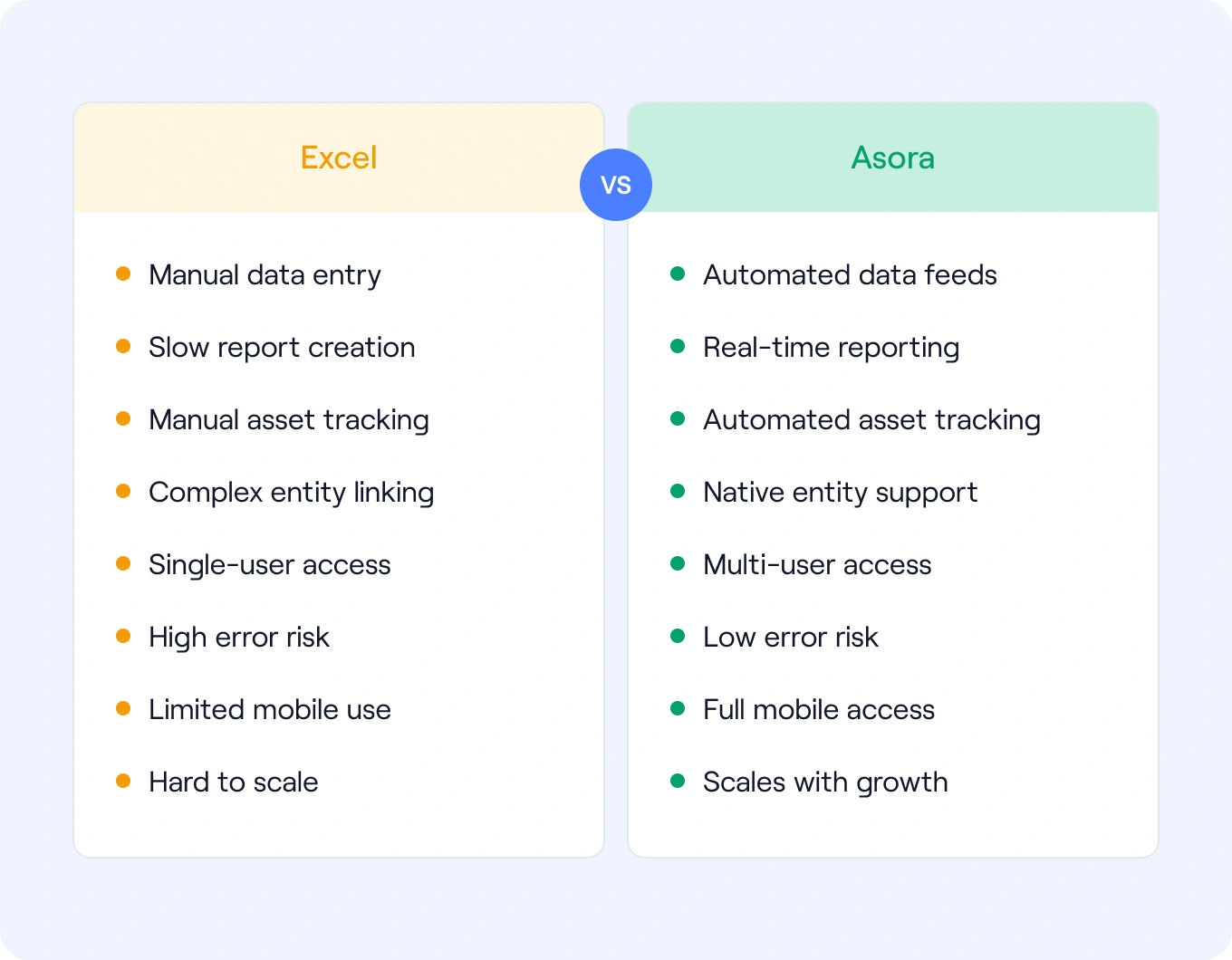
- Manual Data Entry and Consolidation: Teams must log into multiple custodian portals each month, download statements, and manually input data. This time-consuming process introduces errors that can impact investment decisions—especially for multi-family offices managing numerous clients.
- High Error Risk and Version Control Issues: Excel’s flexibility becomes a liability when multiple users work on different copies, creating conflicting reports and confusion. A single misplaced formula can distort performance results.
- Lack of Integration with Custodians and Banks: Excel lacks native bank and custodial-feed aggregation, forcing manual downloads and reconciliation from dozens of sources, delaying consolidated reporting.
- Weak Security and Compliance: While Excel supports encryption and version history, it isn’t designed to manage sensitive family financial data at scale. Files are often shared by email or stored on multiple devices without central access control, increasing risk of data leakage and compliance failures.
- Single-User Limitations and Key-Person Risk: Spreadsheets are often owned by one team member, limiting collaboration and introducing dependency when that person is unavailable.
How Asora Addresses These Pain Points
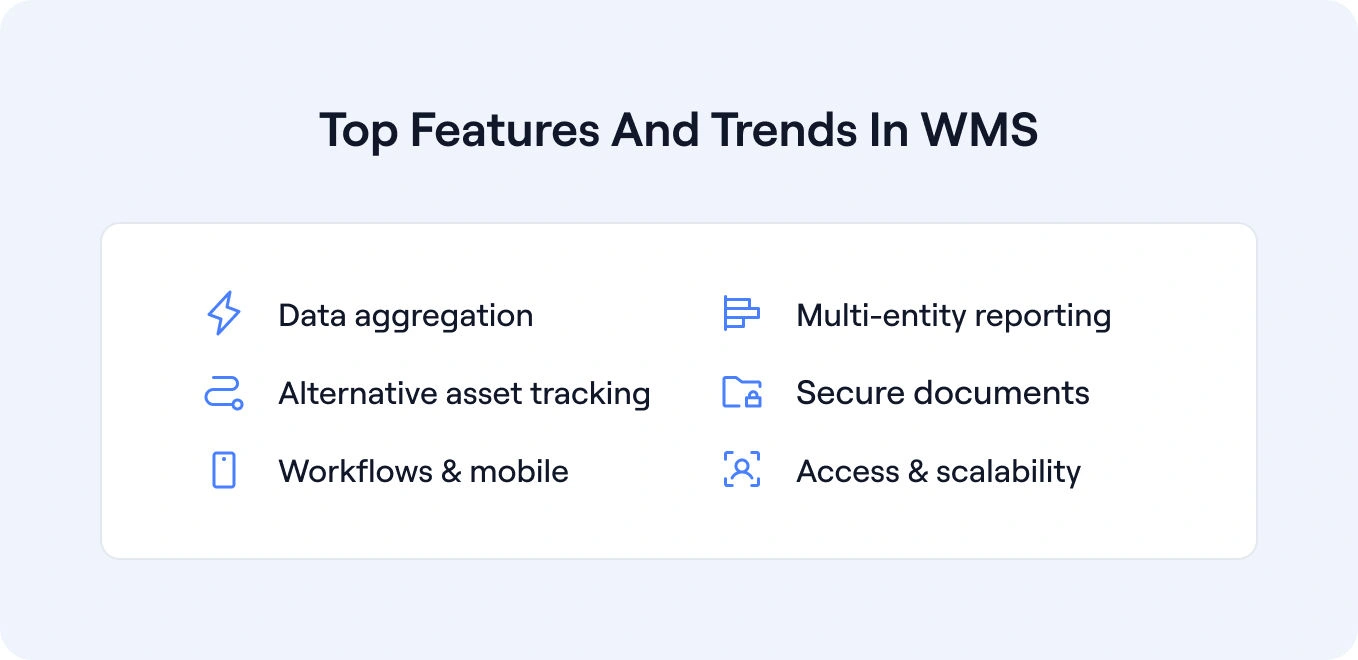
Asora is the natural evolution of family-office reporting—built to overcome the scaling issues that spreadsheets cannot manage effectively.
Automated Data Aggregation
Asora’s data aggregation connects directly to banks, custodians, and investment platforms, automatically updating portfolios. Reporting cycles shrink from weeks to minutes, enabling on-demand accuracy instead of quarterly delays.
Real-Time Multi-Entity Performance Reporting
Performance monitoring provides real-time visibility across entities and asset classes. Asora calculates performance metrics automatically and maintains historical data for trend analysis, delivering accurate consolidated views across trusts, holding companies, and direct investments.
Alternative and Private-Asset Tracking
Asora’s private-asset tracking standardises reporting across public securities, private equity, real estate, and direct investments. It manages capital calls, distributions, and valuations—functionality that would require dozens of linked Excel sheets.
Secure Document Management
Asora’s document management centralises all files in one secure platform. Families can collect and tag documents, ensuring sensitive data stays protected yet accessible to authorised users.
Workflow Support and Mobile Access
Asora’s workflow tools and mobile access keep family members, advisors, and managers connected anywhere, reducing key-person risk. Mobile access gives principals immediate insight without waiting for scheduled reports.
User Permissioning and Scalability
Asora provides granular user permissions, unlike Excel’s limited access control. Offices can grant tailored access by role, scaling easily as new clients, users, or data sources are added—all from one secure hub.
Excel vs Asora: Side-by-Side Comparison
Real-World Outcomes from Switching to Modern Platforms
Bardfour Family Office illustrates the transformation possible beyond Excel. After a real-estate liquidity event, the Pennsylvania-based SFO needed full visibility across complex entities. Within four weeks of implementing Asora, the team achieved complete wealth-structure mapping. The Wealth Map visualisation provided instant clarity that would have required dozens of linked spreadsheets. The result: faster decisions, accurate asset allocation tracking, and relief from the manual burden of Excel maintenance.
Making the Shift from Excel to Asora
Excel’s role in family-office reporting is changing. While still useful for calculations, it no longer suffices as the core platform for complex, multi-asset operations. Asora delivers automation, security, and efficiency, eliminating manual processes and limited visibility. The question isn’t whether to abandon Excel entirely—but whether it’s time to embrace specialised technology that helps teams operate more effectively.
Request a demo to see how Asora can transform your family-office operations from manual spreadsheets to automated, secure, and scalable wealth management.
FAQ
Can I migrate my existing Excel data to Asora?
Yes, Asora supports data migration from Excel and other systems. The platform supports imports from Excel files and bulk export options for users who need to continue using spreadsheets for specific analysis while benefiting from Asora’s automated data aggregation and reporting capabilities.
Is Asora more secure than Excel for sensitive financial data?
Excel security depends on Microsoft 365 features such as sensitivity labels, encryption and access policies, while Asora provides enterprise-grade controls (ISO 27001 certification, 2FA, role-based permissions) and centralized controls to prevent inappropriate file sharing. These safeguards give families confidence that sensitive wealth information is protected and accessible only to the right people.
How does Asora improve data accuracy over Excel?
Asora eliminates manual data entry errors through automated connections to banks and custodians. The platform automates data aggregation, and then maps, cleanses, and standardises it into a unified format.
Is the cost of Asora justified compared to free Excel?
While Excel appears free, the hidden costs of manual data entry, error correction, and delayed reporting cycles often exceed the cost of specialized software. Asora’s automation and artificial intelligence enables family office teams to focus on high-value activities rather than administrative tasks, typically generating returns that far exceed the platform cost through improved operational efficiency and better investment decision-making. Automation can reduce time spent on manual consolidation and report prep; whether this justifies software cost depends on team size, complexity, and reporting cadence.


.png)
 ISO 27001 Certified
 GDPR Compliant